- Real Growth. Proven SEO. Trusted Results.

Free Website Speed Test (Mobile & Desktop)
This free website speed test measures how fast any page loads on a phone and on a desktop computer. It runs Google PageSpeed Insights, shows your Core Web Vitals from real Chrome users, and lists the fixes that will save the most time, in plain English. No signup needed. Built by Los Angeles SEO Inc, an SEO and web design agency in Los Angeles since 2013.
Loading the tool…
How the Website Speed Test Works
1
Enter a page address
Your homepage, a service page or a competitor's page. No account or email needed.
2
Google tests it twice
Google loads the page on a simulated mid-range phone over a slow 4G connection, and again on a desktop computer. It also pulls real-visitor data from the Chrome UX Report.
3
Get your scores and fixes
A 0–100 performance score, your Core Web Vitals, six speed measurements and the fixes that save the most time. Download it as a PDF for your web developer.
What the Speed Test Measures
Six measurements decide how fast a page feels. The first three are Core Web Vitals, which Google uses in its ranking systems.
Largest Contentful Paint (LCP)
Core Web Vital · good under 2.5 s
How long until the biggest image or block of text on the first screen appears. It’s the best single answer to “has this page loaded yet?”
Interaction to Next Paint (INP)
Core Web Vital · good under 200 ms
How quickly the page reacts when someone taps a button or opens a menu. Heavy JavaScript is the usual cause. INP replaced First Input Delay in March 2024.
Cumulative Layout Shift (CLS)
Core Web Vital · good under 0.1
How much the page jumps around while it loads. Images and ads without set sizes cause the “I tapped the wrong button” problem.
Good under 1.8 s
When the first text or image appears, so visitors know the page is working and don’t hit the back button.
Total Blocking Time (TBT)
Lab test · good under 200 ms
How long scripts lock up the page while it loads. It’s the lab stand-in for INP, and the first number to improve when INP is slow.
Time to First Byte (TTFB)
Good under 0.8 s
How long your server takes to start sending the page. Slow hosting, missing page caching or too many plugins show up here first.
Why Website Speed Matters for SEO and Leads
Google uses Core Web Vitals as part of its page experience signals, so a slow page can rank below a faster competitor with similar content. Speed matters even more to people: most visitors are on phones, and many leave when a page takes more than a few seconds to show anything.
A faster site keeps more visitors on the page long enough to read, call or fill in your form. Speed is one part of SEO, so run the full audit to see the rest.
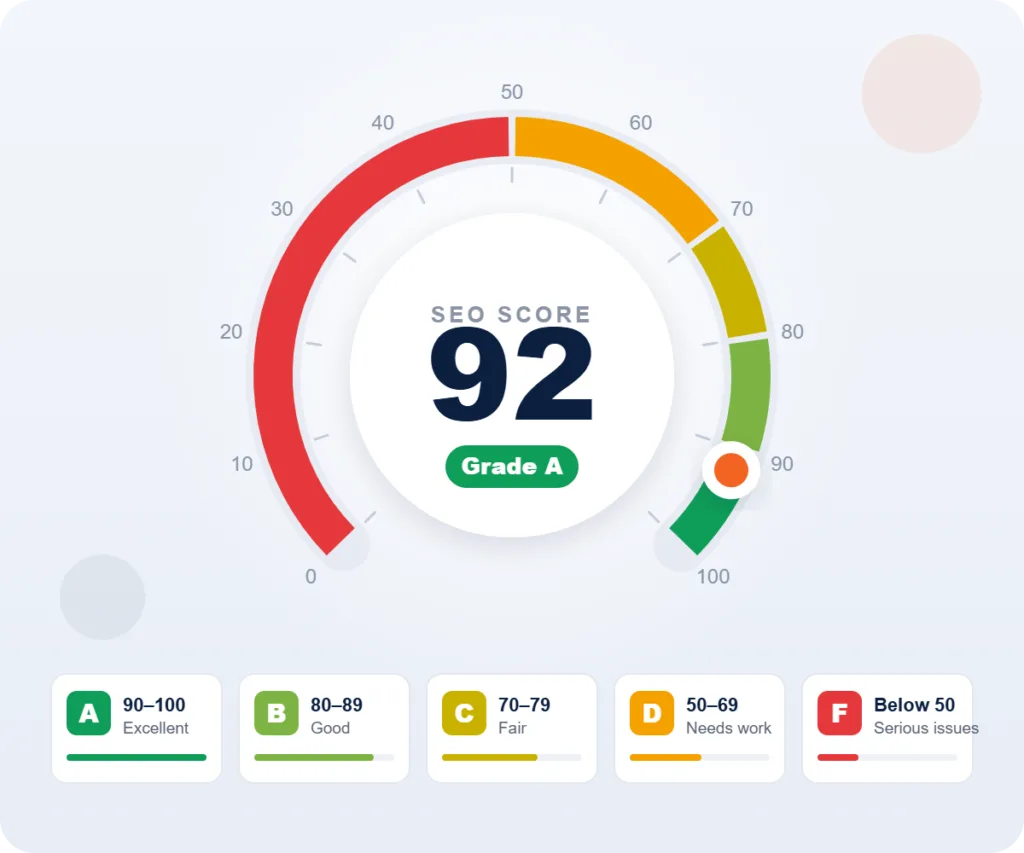
How to Read Your Speed Score
- 90–100: Fast. Keep it that way by re-testing after every plugin, theme or design change.
- 50–89: Needs improvement. Usually a few large images, render-blocking files or slow hosting.
- 0–49: Slow. Visitors are likely leaving before the page loads. Start with the top item in "What to fix first."
- Mobile scores are usually lower. Google tests on a mid-range phone over slow 4G, so 60 on mobile and 90 on desktop is common.
- Lab score vs. real visitors. The score is a lab test and changes a little each run. Core Web Vitals from real Chrome users are what Google uses for ranking.
- Test more than the homepage. Service pages and blog posts often use different templates and have different problems.
How to Speed Up Your Website: A Checklist
Most slow small-business websites have the same few problems. Work through these in order. Hosting, caching and images usually make the biggest difference.
Hosting & Caching
- Turn on page caching (your host's cache, LiteSpeed Cache or WP Rocket)
- Choose hosting with a server response under 0.8 s
- Add a CDN such as Cloudflare
- Keep PHP, WordPress and plugins up to date
Images
- Resize images to the size they are shown
- Compress them and serve WebP or AVIF
- Lazy-load images below the first screen
- Never lazy-load the main hero image
Code & Plugins
- Remove plugins you don't use
- Delay non-essential JavaScript until the visitor interacts
- Remove unused CSS or generate critical CSS
- Minify CSS and JavaScript files
Third-Party Scripts
- Remove old tracking pixels and widgets
- Load chat widgets after the page is ready
- Run tags through one tag manager
- Use click-to-load previews for YouTube embeds
Fonts & Layout
- Use two font families or fewer
- Preload key fonts and use font-display: swap
- Set a width and height on images, ads and embeds
- Reserve space for banners and cookie notices
Measure & Maintain
- Re-test after every plugin, theme or design change
- Watch Core Web Vitals in Google Search Console
- Test your top landing pages, not just the homepage
- Check mobile first
Want Your Website to Load Faster?
Our team speeds up WordPress, WooCommerce and custom websites: hosting and caching, image optimization, code cleanup and Core Web Vitals fixes. We test before and after, so you can see exactly what changed. Serving Los Angeles and businesses nationwide since 2013.
Website Speed Test FAQs
Answers about page speed, Core Web Vitals and this free tool.
Is this website speed test free?
Yes. There’s no signup, no email and no credit card. The test runs on Google PageSpeed Insights, the same engine behind Google’s own speed tool, and adds plain-English explanations and a fix list.
What is a good website speed score?
A performance score of 90 or higher is fast, 50–89 needs improvement and under 50 is slow. For real visitors, aim for Largest Contentful Paint under 2.5 seconds, Interaction to Next Paint under 200 milliseconds and Cumulative Layout Shift under 0.1.
Why is my mobile score lower than my desktop score?
Google tests mobile on a simulated mid-range phone with a slow 4G connection, so the same page scores lower than on a fast desktop computer. Mobile matters most, because Google indexes the mobile version of your site and most local searches happen on phones.
Why does my score change each time I test?
Lab tests vary with server load, network conditions, ads and third-party scripts. Run the test two or three times and look at the trend. Core Web Vitals from real visitors change slowly and are more reliable.
What are Core Web Vitals?
Core Web Vitals are three Google measurements of page experience: Largest Contentful Paint (loading), Interaction to Next Paint (responsiveness) and Cumulative Layout Shift (visual stability). A page passes when at least 75% of real visits meet the “good” threshold for all three.
Does page speed affect SEO rankings?
Yes, as one of many signals. Google uses Core Web Vitals as part of its page experience signals. Relevance and content quality matter more, but when pages are otherwise similar, speed can make the difference, and it strongly affects whether visitors stay and contact you.
What happened to Google's Mobile-Friendly Test?
Google retired its Mobile-Friendly Test in December 2023. Use the mobile results of this speed test, Lighthouse in Chrome, and our free SEO audit, which checks the viewport and other mobile settings.
How do I make my WordPress site faster?
Start with page caching and good hosting, then compress and resize images and serve them as WebP. Remove plugins you don’t use and delay non-essential JavaScript. The checklist above covers the steps in order.
How much does website speed optimization cost?
It depends on your platform, hosting and how many plugins and scripts the site uses. Our team reviews your site for free and gives you a fixed quote before any work starts. For ongoing care, see our website maintenance plans.