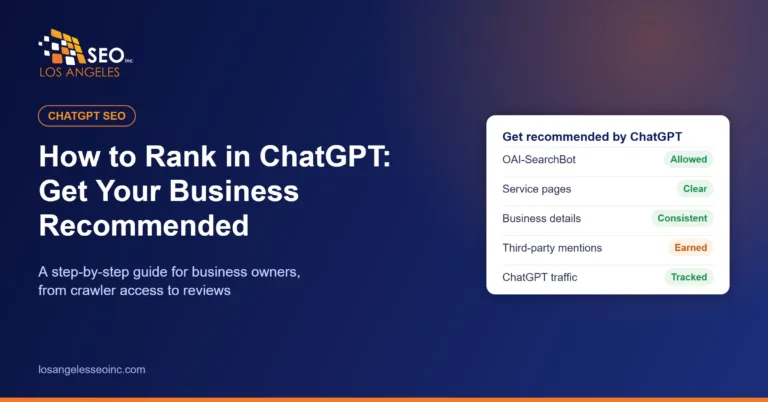
To rank in ChatGPT, make sure OpenAI’s search crawler can read your site, publish clear pages that answer the exact questions buyers ask, keep your business details identical everywhere they appear online, and earn mentions on websites ChatGPT already trusts. There is no way to pay for a place inside ChatGPT’s answer and no form to submit your business. Recommendations come from what ChatGPT can find and confirm about you across the web. Here is how to rank in ChatGPT, step by step, using the same process we follow with clients, plus how to check your progress.
Key Takeaways
- ChatGPT search relies on OpenAI’s crawler, OAI-SearchBot. If your site blocks it, your pages cannot appear in ChatGPT search answers.
- ChatGPT recommends businesses it can describe with confidence: what you do, where, for whom and why people trust you.
- Third-party mentions such as reviews, directories, local news and “best of” lists carry a lot of weight.
- Sponsored ads in ChatGPT are separate from the answer. Ranking in the answer itself cannot be bought.
- You can measure ChatGPT traffic in Google Analytics, because ChatGPT adds utm_source=chatgpt.com to links it sends.
How ChatGPT Decides Which Businesses to Recommend
When someone asks ChatGPT for “a good family dentist in Glendale” or “the best payroll software for a small restaurant,” ChatGPT often searches the web, reads the pages it finds and writes an answer with links. OpenAI does not publish ranking factors. Its publishers and developers FAQ says any public website can appear and that pages are surfaced when there are signals they are relevant to the question.
From our own testing, the businesses that show up tend to have three things in common: their website states clearly what they offer and where, other trusted websites describe them the same way, and they have recent reviews that mention the service being asked about. We cover the mechanics in more depth in how AI search engines pick which businesses to mention.
Step 1: See What ChatGPT Says About You Today
Before changing anything, ask ChatGPT the questions your customers ask. Use several versions: “best [service] in [city],” “who should I hire for [problem],” “[your business name] reviews,” and a comparison with a competitor. Try it while logged out as well, and write down which businesses appear, what ChatGPT says about you and which sources it links. If you would rather not do this by hand, our free AI visibility check runs these questions for you and shows the results.
Step 2: Let OpenAI’s Search Crawler Read Your Site
OpenAI’s crawler documentation lists three main bots. OAI-SearchBot surfaces websites in ChatGPT search, and sites that block it will not appear in ChatGPT search answers. GPTBot collects content that may be used for model training. ChatGPT-User visits a page when a user asks ChatGPT to open it. You can block GPTBot if you do not want your content used for training and still allow OAI-SearchBot so you can be found.
Check two places: your robots.txt file and your firewall or CDN settings. Some security tools, including bot-blocking options in services like Cloudflare, can stop AI crawlers without anyone noticing. OpenAI notes it can take about 24 hours for a robots.txt change to take effect.
Step 3: Publish Pages That Answer Buyer Questions
ChatGPT quotes pages that answer a question directly. For each main service, create one page that says in the first two sentences what you do, who it is for and where you work. Then cover what is included, typical timelines, what affects the price, and what makes your business different. Add a short FAQ with the real questions customers ask on the phone. Vague pages that say “we provide quality solutions” give ChatGPT nothing to repeat.
Step 4: Keep Your Business Details Identical Everywhere
ChatGPT cross-checks what it reads. If your website says one address, your Google Business Profile another, and an old directory still lists a phone number you stopped using, you look less certain. Make your business name, address, phone, website, hours and service list match on your site, Google Business Profile, Bing Places, Apple Business Connect, Yelp, BBB and the directories that matter in your industry. Add Organization or LocalBusiness schema to your site so the same details are available in a structured form.
Step 5: Earn Mentions on Sites ChatGPT Trusts
When ChatGPT answers “who is the best,” it leans on sources that compare businesses: review platforms, industry directories, local news, associations and well-maintained “best of” lists. Getting listed and described accurately on those sites often matters more than anything you change on your own website. Useful places to start:
- Industry directories and association member pages
- Local news features, sponsorships and community events
- Reputable review and comparison sites for your category
- Partner and supplier websites that list you as a customer or provider
Avoid paid link schemes and fake list sites. They rarely help and can damage trust in both Google and AI answers.
Step 6: Build a Steady Flow of Detailed Reviews
Reviews tell ChatGPT what you are actually good at. A review that says “they fixed our tankless water heater the same day” helps you appear for tankless water heater questions far more than “great service.” Ask happy customers for a review after each job and make it easy with a direct link. Reply to reviews, including negative ones, with specifics.
Step 7: Track ChatGPT Traffic and Recheck Monthly
Learning how to rank in ChatGPT is an ongoing process, not a one-time fix, so measurement matters.
ChatGPT adds utm_source=chatgpt.com to the links it sends, so you can see those visits in Google Analytics under traffic sources. Each month, repeat the questions from step 1 and note what changed. AI answers vary from one session to the next, so look for trends over several checks rather than reacting to a single answer.
How to Rank in ChatGPT: A Real Example
In a November 2026 AI visibility scan, our client Beverly Hills Bagel appeared second in both ChatGPT and Perplexity for “best bagel shop in Beverly Hills.” The work behind it was not a trick: a clear website, an accurate Google Business Profile, consistent listings and steady reviews from real customers. The same steps that support local SEO are the ones AI assistants rely on.
Mistakes That Keep Businesses Out of ChatGPT
- Blocking AI crawlers by accident through a security plugin or CDN setting
- One “Services” page that lists everything in a single paragraph
- Different business names or phone numbers across listings
- No reviews that mention specific services
- Expecting ChatGPT ads to place you inside the answer
Frequently Asked Questions
How do I get my business recommended by ChatGPT?
Allow OAI-SearchBot to crawl your site, publish clear service pages, keep your business details consistent across the web, and earn reviews and mentions on trusted third-party sites. Then check monthly how ChatGPT describes you.
Can I pay to rank in ChatGPT?
No. ChatGPT ads appear separately and are labeled as sponsored. OpenAI says ads do not influence answers, and there is no paid way into the answer itself.
Does blocking GPTBot stop my business from appearing in ChatGPT?
No. GPTBot relates to model training. Search inclusion depends on OAI-SearchBot, so you can block one and allow the other.
How long does it take to show up in ChatGPT?
Crawl changes can take effect within about a day, but earning mentions, reviews and trust usually takes months. Most businesses see gradual movement rather than an overnight change.
Is ranking in ChatGPT different from Google SEO?
It overlaps heavily. Clear pages, consistent business information and reviews help in both. ChatGPT places extra weight on how other websites describe you, so third-party mentions matter even more.
Want ChatGPT to recommend your business? Our ChatGPT SEO service handles each of these steps and reports your AI mentions every month. Start with a free AI visibility check.