Google Ads Campaign Optimization: 6-Step Framework for Higher ROI
Success on this platform comes down to intent and relevance. You need to present the right message to the right person at the exact moment they are looking for your solution. By following a proven framework, you can stop subsidizing Google’s profits and start driving meaningful results for your business. Here is how to build a campaign designed for conversions. Maximize your ROI with our proven 6-step framework for optimizing Google Ads campaigns. Learn how to boost performance and reduce wasted ad spend today!
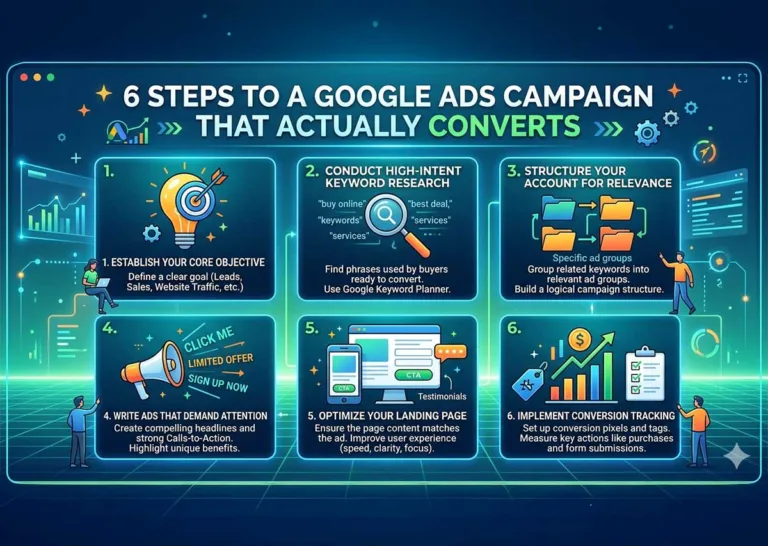
1. Establish Your Core Objectives
Before you select a single keyword, you must define exactly what a conversion means for your business. Google’s algorithms use your stated goals to optimize ad delivery. If you feed the system the wrong objective, it will optimize for the wrong outcome.
Are you trying to generate phone calls, collect email addresses, or sell physical products? Choose one primary goal per campaign. This focus allows you to tailor your ad copy and landing page specifically to that desired action. A campaign aimed at driving local foot traffic will look entirely different from one designed to sell enterprise software.
2. Conduct High-Intent Keyword Research
Keywords act as the bridge between your customer’s problem and your solution. The biggest mistake new advertisers make is targeting broad terms that lack clear intent. For example, bidding on “shoes” will burn through your budget instantly. Bidding on “men’s leather dress shoes size 10” targets a buyer who is ready to pull out their wallet.
Focus on Commercial Intent
Group your keywords based on what the user is trying to accomplish. Look for modifiers that indicate a readiness to buy, such as “hire,” “buy,” “near me,” or “pricing.” You can use free resources like the Google Ads Keyword Planner to discover terms your audience is actively searching for and check their estimated cost per click.
Build a Negative Keyword List
A negative keyword list tells Google when not to show your ad. If you sell luxury watches, you want to add “cheap” and “free” to your negative keyword list. This prevents your ads from appearing to bargain hunters who have no intention of purchasing a high-end product, protecting your daily budget from useless clicks.
3. Structure Your Account for RelevanceYour Heading Text Here
A disorganized Google Ads account leads to generic messaging and low Quality Scores. Google rewards relevance. The closer your ad copy matches the user’s search query, the less you will pay per click.
Divide your campaigns by broad categories, and then break those down into tightly themed ad groups. If you run a plumbing business, you should not lump all your services into one ad group. Create separate ad groups for “emergency pipe repair,” “water heater installation,” and “drain cleaning.” This structure allows you to write specific ads for specific problems.
4. Write Ads That Demand Attention
Your ad copy has one job: convince the user to click your link instead of the organic results or your competitors’ ads. Boring, feature-heavy text will get ignored. You must speak directly to the user’s pain points and offer a clear benefit.
Use the Target Keyword in the Headline
When a user sees their exact search query in your headline, they instantly know your ad is relevant. Pin your most important keywords to the first headline position.
Include a Strong Call to Action
Tell the user exactly what they need to do next. Phrases like “Get a Free Quote,” “Book Your Appointment,” or “Shop the Summer Sale” eliminate confusion and prompt immediate action. Make sure this call to action aligns perfectly with the next step they will take on your website.
5. Optimize Your Landing Page
A great ad will get the click, but the landing page secures the conversion. If you send paid traffic to your generic homepage, you are wasting your money. Your homepage is full of distractions, navigation menus, and competing offers.
Send your ad traffic to a dedicated landing page built specifically for that campaign. The headline of the landing page must match the promise made in the ad. If your ad promises a 20% discount on roofing repairs, that discount should be the first thing the user sees when the page loads. Keep the design clean, ensure the page loads instantly on mobile devices, and make the contact form or checkout process incredibly simple.
6. Implement Conversion Tracking
Running a campaign without conversion tracking is like driving blindfolded. You might be moving fast, but you have no idea where you are going. Conversion tracking allows you to see exactly which keywords, ads, and audiences are generating revenue.
Install the Google tracking tag on your website and set up specific conversion actions. Once the data starts flowing, you can make informed decisions about where to allocate your budget. You might discover that a keyword you thought was a winner is actually draining your budget, while a low-volume keyword is producing all your highly qualified leads.
If setting up tags, analyzing data, and managing bids feels overwhelming, it often makes sense to partner with professionals. By investing in expert Google Ads management, you can ensure your campaigns are continuously optimized for a strong return on investment, rather than burning time on trial and error.
Frequently Asked Questions
How long does it take for a campaign to start working?
Most new campaigns need a learning period. You can expect to see initial data and traffic immediately, but significant optimization results typically take 30 to 90 days. The algorithm needs time to test different ad combinations and understand user behavior.
What is a good starting budget?
A functional starting budget depends on your industry and local competition. However, a common recommendation is to allocate sufficient budget to generate 10-20 clicks per day. This provides enough data to make informed optimization decisions within the first month.
Does a high click-through rate guarantee sales?
No. A high click-through rate simply means your ad is appealing. If your landing page is poorly designed, loads slowly, or doesn’t align with the user’s intent, those clicks will never convert into sales.
Next Steps for Your Search Campaigns
Launching a profitable Google Ads campaign requires patience, testing, and continuous refinement. The set-it-and-forget-it approach simply does not work in modern search advertising. Start by verifying your conversion tracking is active and accurate. Then, review your search terms report to filter out irrelevant traffic with negative keywords. By focusing on high-intent keywords and delivering a seamless landing page experience, you will transform your ad spend from a business expense into a reliable profit center.