
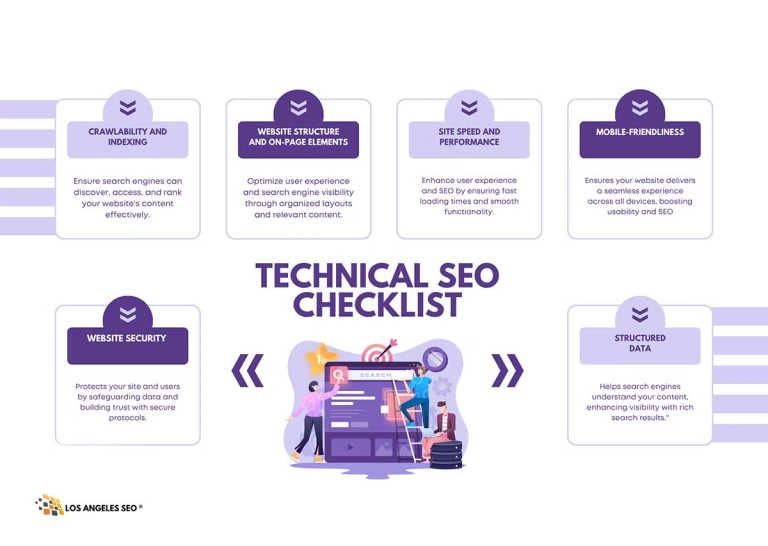
In this article, you can learn to enhance your website’s performance by utilizing our complete Technical SEO Checklist.
A strong technical foundation is crucial for any website aiming to achieve high search engine rankings. Technical SEO ensures that search engines can effectively crawl, index, and understand your content. Neglecting this aspect can undermine even the best content marketing efforts. This comprehensive checklist provides actionable steps for marketers and developers to audit and optimize a website’s technical health. By following these points, you can build a solid base that supports your broader SEO strategy and helps you gain a competitive edge.
The 5-Step Technical SEO Checklist + Expert Tips
Boost your website’s performance with our simple 5-step technical SEO checklist. Improve rankings and enhance user experience.
Crawlability and Indexing
This section focuses on ensuring search engines can find and index your pages. If search engines can’t access your content, it won’t rank.
1. Check Indexing Status
First, understand how many of your pages are currently indexed by Google.
- Action: Use Google Search Console’s “Index Coverage” report. This will show you which pages are indexed, which have warnings, and which are excluded.
- Tip: You can also perform a
site:yourdomain.comsearch on Google. This gives you a rough estimate of indexed pages. If the number is drastically different from the number of pages on your site, you may have an indexing problem.
2. Optimize Your Robots.txt File
Your robots.txt file tells search engine crawlers which pages or files they can or cannot request from your site.
- Action: Locate your
robots.txtfile atyourdomain.com/robots.txt. Ensure it is not blocking important content or sitewide resources like CSS and JavaScript files. - Tip: Use Google’s Robots.txt Tester in Search Console to verify that you are not unintentionally blocking the Googlebot from crawling essential pages.
3. Manage Your XML Sitemap
An XML sitemap lists a website’s important pages, making sure Google can find and crawl them all.
- Action: Generate an XML sitemap that includes all the valuable pages you want to be indexed. Most modern CMS platforms and SEO plugins can create one automatically for you.
- Tip: Submit your sitemap URL to Google Search Console and Bing Webmaster Tools. Ensure the sitemap is updated automatically as you add or remove pages.
4. Fix Crawl Errors
Crawl errors occur when a search engine tries to reach a page on your website but fails.
- Action: Regularly review the “Coverage” report in Google Search Console for errors like 404s (Not Found) or server errors (5xx).
- Tip: For 404 errors on pages that have inbound links or traffic, implement a 301 redirect to the most relevant live page. This preserves link equity and improves the user experience.
Website Structure and On-Page Elements
A logical site structure helps both users and search engines navigate your content easily.
1. Implement a Logical Site Architecture
A clean, hierarchical structure makes your site intuitive.
- Action: Organize your content into logical categories. Aim for a “flat” architecture, where important pages are no more than three or four clicks from the homepage.
- Tip: Use breadcrumb navigation. Breadcrumbs visually indicate the user’s position in the site’s hierarchy, improving usability and internal linking.
2. Use SEO-Friendly URLs
URLs should be simple, readable, and descriptive.
- Action: Create URLs that are easy to understand for both humans and search engines. Include your primary keyword for the page. For example:
yourdomain.com/services/technical-seo-audit. - Tip: Use hyphens (-) to separate words, not underscores (_). Keep URLs as short as possible while remaining descriptive.
3. Check for Duplicate Content
Duplicate content happens when the same or similar content appears on multiple URLs, which can dilute your ranking signals.
- Action: Use a tool like Siteliner or Ahrefs’ Site Audit to find instances of duplicate content on your website.
- Tip: Use canonical tags (see next section) to tell search engines which version of a URL is the master copy that you want to be indexed.
4. Implement Canonicalization
A canonical tag (rel="canonical") is a snippet of HTML code that defines the main version for duplicate, near-duplicate, and similar pages.
- Action: Add a
rel="canonical"tag to the<head>section of each page to specify its preferred URL. This is especially important for pages accessible via multiple URLs (e.g., with tracking parameters). - Tip: Ensure that your canonical tags point to live, indexable pages. A canonical tag pointing to a 404 or a noindexed page will be ignored.
Site Speed and Performance
Page speed is a confirmed ranking factor for both desktop and mobile searches. A slow site frustrates users and can harm your rankings.
1. Measure Your Website Speed
First, benchmark your current performance.
- Action: Use Google’s PageSpeed Insights to analyze your site’s speed on both mobile and desktop. It provides a performance score and specific recommendations for improvement.
- Tip: Test key pages, not just your homepage. Product pages, blog posts, and category pages are equally important.
2. Optimize Images
Large, unoptimized images are one of the most common causes of slow page load times.
- Action: Compress all images before uploading them. Use modern image formats like WebP, which offer high-quality compression.
- Tip: Implement lazy image loading. This defers loading off-screen images until the user scrolls to them, speeding up the initial page load.
3. Leverage Browser Caching
Browser caching allows repeat visitors to load your site faster by storing files locally on their devices.
- Action: Configure your server to set appropriate cache-control headers for static assets like images, CSS, and JavaScript.
- Tip: If you use a CMS like WordPress, plugins like W3 Total Cache or WP Rocket can easily configure caching for you.
4. Minify CSS, JavaScript, and HTML
Minification removes unnecessary characters from code (like spaces, comments, and line breaks) without changing its functionality.
- Action: Use tools to minify your HTML, CSS, and JavaScript files. This reduces file sizes and speeds up download, parsing, and execution.
- Tip: Many performance plugins and Content Delivery Networks (CDNs) offer auto-minify features.
Mobile-Friendliness
With Google’s move to mobile-first indexing, a site’s mobile version is the baseline for how Google determines rankings.
1. Use a Responsive Design
Responsive design allows your website to adapt to any screen size.
- Action: Ensure your website provides a good experience across all devices, from desktops to tablets and smartphones. All content and functionality should be accessible on mobile.
- Tip: Use Google’s Mobile-Friendly Test to quickly check if a page on your site is considered mobile-friendly.
2. Check for Mobile Usability Issues
Beyond responsiveness, other issues can hinder the mobile experience.
- Action: Review the “Mobile Usability” report in Google Search Console. It will flag issues like text being too small to read, clickable elements being too close together, or content being wider than the screen.
- Tip: Avoid using intrusive interstitials (pop-ups) on mobile that cover the main content. Google penalizes sites that use them aggressively.
Security and Structured Data
These final checks ensure your site is secure for users and provides extra context to search engines.
1. Implement HTTPS
HTTPS encrypts the data exchanged between a user’s browser and your website, protecting their privacy and security.
- Action: Obtain and install an SSL certificate on your server. Ensure that all HTTP traffic is permanently redirected (301) to the HTTPS version.
- Tip: After migrating to HTTPS, update your URL in Google Analytics and resubmit your sitemap in Google Search Console using the new
https://prefix.
2. Use Structured Data (Schema Markup)
Structured data is a standardized format for providing information about a page and classifying its content.
- Action: Implement relevant schema markup for your content. Common types include Article, Product, Review, FAQ, and LocalBusiness.
- Tip: Use Google’s Rich Results Test to validate your structured data and see which rich results your page may be eligible for. Correctly implemented schema can enhance your search listings with stars, prices, and FAQs, improving click-through rates.
3. Check for Hreflang on International Sites
If your website targets multiple countries or languages, the hreflang attribute is essential.
- Action: Implement
hreflangtags to tell Google which language and regional URL you are using for specific pages. - Tip: Ensure that
hreflangtags are reciprocal. If page A links to page B in another language, page B must link back to page A.
Conclusion
Technical SEO is not a one-time task but an ongoing process. Search engines are constantly evolving, and your website will change over time. Regularly working through this checklist will help you identify and fix issues before they impact your performance. By maintaining a technically sound website, you create a strong foundation that empowers your content to reach its full potential and achieve sustained visibility in search results.